
Analyzing Log Files for GEO Insights (Using Prompt-Tracking Tools)

“Log files” refers to server access logs, which are records of requests processed and recorded by a web server or related infrastructure.
Whenever a search-engine or AI crawler requests a page or resource, the server may record information such as the requested URL, date and time, user agent, and status code, among other data.
Log-file analysis shows what crawlers actually do on your website (i.e., which pages and resources crawlers request and how your server responds), rather than what you assume they’re doing.
This data can be a valuable addition to an SEO/GEO strategy.
I recently connected my log files to a prompt-tracking tool, which shows me which AI bots are reaching my content. In this guide, I’ll explain how to analyze and take action from that information.
Note: we’ll be looking at two days’ worth of data only using Peec AI connected via WordPress, but this’ll be enough for instructional purposes.
Folders
The first data point to look at is which folders are being hit the most by AI bots.

In my case, the AI bots are overwhelmingly focused on my blog articles. Not surprising. But there are some interesting points, as well.
Let’s go folder by folder:
- blog – my blog posts
- wp-json – WordPress’s REST API, which can expose post and site data in a structured format.
- root – requests to the homepage or other root-level URLs
- root-assets – assets such as images, CSS, JavaScript, icons, or files stored at the domain root
- consulting-llc – the consulting section of my website
- ai-information – a markdown page specifically made for AI assistants
Most interesting is the AI information page. It was linked only on my homepage and, evidently, it may have served its purpose: feeding the AI bots with information about me.
The main takeaway here is that the information I want the AI bots to focus on — my blog content, primarily — is getting the most attention. That’s a positive trend.
What you want to confirm in your own log files is whether the AI bots are focused on the content folders with value to your business or are they looking in places where you’d prefer them not to.
URLs
The next data point to look at is individual URLs by bot hits.

This tells me an interesting story. One of my articles is getting around 41% of all bot visits.
That’s an article I wrote a few years ago that probably could use a refresh. It’s also an article I don’t currently have any prompts tracking for.
That’s a gap.
If I see content that is hit repeatedly by bots, I should add relevant prompts to my tracking setup so I can test whether the page appears for related questions and how my content is represented in the resulting answers. (I’m going to correct that right now by adding the following prompt to my tracking: “What is helpful, reliable, people-first content for SEO/GEO?”)
I also see related content thematically being hit by bots, such as articles related to:
- Spam policies
- Search Quality Rater Guidelines
- People-first SEO
- Google’s AI optimization guidance
Albeit based on a small sample size, this suggests bots are spending substantial attention on content about helpful content and Google’s guidance around its quality. If this pattern holds over time, it might behoove me to create more of that type of content.
I also see attention paid to AI search topics, like:
- Peec AI
- Perplexity
- Google query fan-out
- RAG and NotebookLM
This is probably my strongest topical cluster after content quality and another area I could focus on in the future.
But again, I don’t necessarily track prompts that would lead to these sources being retrieved as sources or citations.
As a takeaway, I might want to create more content that thematically aligns with what’s popular here, but I also want to ensure my prompt-tracking setup covers these pages so I can gauge their performance in AI-generated chats (not just in terms of bot hits).
What to confirm in your own log files is whether your important content is being visited by AI bots, whether you have plans to create more of that type of content, and whether you’re actively tracking its performance in your prompt-tracking setup.
Platform
So far we know what content bots have hit, but we don’t know which AI assistants those bots are associated with. That’s where platforms comes into play.
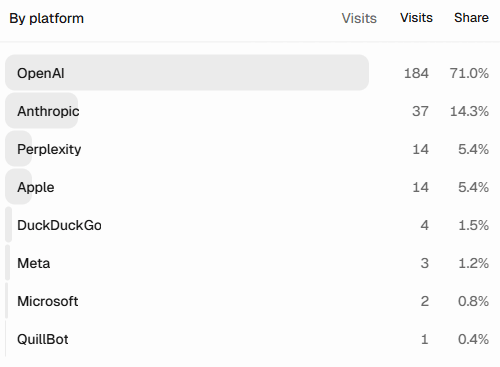
This data shows that 71% of bot visits to my content come from OpenAI (ChatGPT), followed by Anthropic (Claude) at 14.3% and Perplexity at 5.4%. Microsoft (Copilot, etc.) plays a small role at 0.8%.
This likely tells me that ChatGPT is repeatedly hitting that People First Content article we observed earlier, but we’ll know more once we look at the user agents in a sec.
In terms of takeaways, I’m encouraged by this data as it suggests the AI assistants I would care most about (ChatGPT, Claude, and Perplexity) are able to reach my content.
This is largely confirmed by the status codes table as well, showing mostly 200 (with a few expected redirects and 404s):

What to confirm in your own log files is a) whether you recognize the platforms visiting your content and b) whether the top platforms align with your AI visibility goals.
Bots
Now we get to the fun part: user agents. Basically, are the bots visiting my content doing so for training data, search, or user queries?
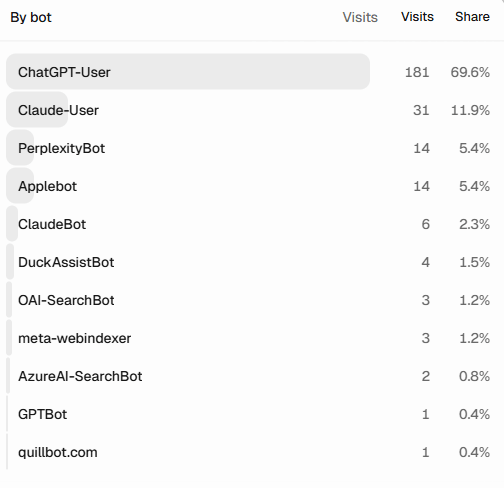
We see that user query bots are dominant here, specifically from ChatGPT (ChatGPT-User) and Claude (Claude-User).
This is confirmed by the bot type table, as well:

ChatGPT-User is not OpenAI’s normal automatic search crawler. It’s used when a person’s activity in ChatGPT (or a Custom GPT) causes ChatGPT to visit a webpage. Anthropic describes Claude-User similarly: Claude may retrieve a website in response to a user’s question.
That means the overwhelming majority of requests were associated with user-triggered activity rather than automated search crawling or potential training-data collection.
Those requests may have helped the assistants formulate an answer or provide a source, but the log files alone can’t tell me what appeared in the final response.
That’s all interesting, but it also suggests I should keep an eye out for changes in this data — remember, we’re just looking at two days’ worth here. From a GEO perspective, I’m especially interested in successful access from search crawlers and user-query bots, as those activities are more directly connected to discoverability and answer-time retrieval. Of course, training bot activity is also worth documenting, although it doesn’t necessarily prove that the content entered a model’s training data.
What to confirm in your own log files is what types of bots are visiting your content and what you can infer about user behavior from that.
Takeaways
Log files and prompt tracking answer different but complementary questions. Log files show which AI systems are requesting your content, while prompt tracking shows whether your brand or content appears in the monitored answers.
From this two-day snapshot, I learned that:
- Most AI-related requests were directed toward my blog, which is the section of my website I most want these systems to access.
- One older article accounted for a disproportionate share of requests, revealing both a content-refresh opportunity and a gap in my prompt-tracking setup.
- Related articles formed recognizable topical clusters around people-first content, Google quality guidance, AI search, and retrieval.
- OpenAI and Anthropic generated most of the activity, suggesting that my content is accessible to the AI platforms most relevant to my strategy.
- Most requests came from user-query bots, such as ChatGPT-User and Claude-User, rather than from automated search or training crawlers.
The most useful insight isn’t that AI bots visited my website, though. It’s that log files can reveal where my GEO measurement strategy is incomplete.
If a page receives meaningful visits from AI bots but is not represented in my prompt-tracking setup, I can add relevant prompts. Furthermore, when a topic consistently attracts retrieval activity, I can consider refreshing my existing content or creating additional content around that topic.
The reverse is also true. The pages I expect to support my tracked prompts may not be the pages receiving the most AI bot requests.
Of course, log files shouldn’t be treated as proof of AI visibility. A log entry is an access signal only. It doesn’t confirm that a page was used as a source or citation, let alone that my brand was mentioned or recommended.
That’s why log file analysis is an important component of a larger GEO strategy.
I’ll update this article in the future, or write a follow-up, if the data changes substantially.
Also, if you want a hand with your prompt-tracking strategy, feel free to get in touch with me. I’m an independent SEO/GEO consultant helping brands and agencies with their AI visibility goals.
Until next time, enjoy the vibes:
Thanks for reading. Happy optimizing!
Related posts
A Complete Guide to Using Peec AI (with Actionable Takeaways)
A Complete Guide to Using Peec AI (with Actionable Takeaways) Peec AI is an AI visibility tool where you (as the user) track prompts for…
How to Audit and Expand Your Prompt-Tracking Setup With AI (Practical GEO Advice)
How to Audit and Expand Your Prompt-Tracking Setup With AI (Practical GEO Advice) This won’t be a comprehensive guide to prompt selection. There are already…
How to Track Prompts for Different Geographic Locations (GEO Strategy)
How to Track Prompts for Different Geographic Locations (GEO Strategy) Whether you run a local business or a global brand, you may need to track…
Leave a Reply